Students forgive an average camera. They never forgive bad audio, dark video, or echo. The good news: a professional-looking class setup costs far less than most teachers fear — and the biggest upgrades are technique, not money. Here are three proven setups and the settings that make them shine.
1. The ₹0–5,000 starter setup (better than most)
Your phone's rear camera (1080p, 30fps) beats most webcams. Prop it at eye level, stand near a window facing the light, and use wired earphones with an inline mic — held clipped to your collar with a rubber band, it beats most laptop microphones. That's genuinely a working setup for live classes tonight.
- Phone rear camera, 1080p/30fps, locked at eye level
- Face a window (never sit against one)
- Wired earphone mic clipped 15cm below your chin
- Free teleprompter app for scripted segments
2. The ₹20,000–30,000 serious setup (the sweet spot)
This is where most PrepVidya educators land: a USB dynamic microphone (Samson Q2U or MAONO PD200X, ₹6–10k) on a boom arm — dynamic mics ignore room echo, which is 70% of 'sounding professional'. Add a key light (a ₹2–4k LED panel at 45° off-camera) and a 1080p webcam or your phone as camera via a free webcam app. Record on a platform that stores the master automatically — SuperLive classes auto-record into your course library, so 'the recording' is never a separate task.
3. The ₹60,000–80,000 studio look (only when it pays for itself)
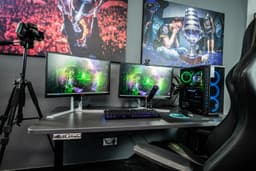
At scale — a full recorded course library, 40+ students paying for a premium batch — a mirrorless camera with clean HDMI (Sony ZV-E10 or used α6400), a lavalier or shotgun mic, two lights and an acoustic panel behind you produce the 'institute' look that justifies premium pricing. Buy this with batch revenue, not before it.
4. The five settings that matter more than gear
Frame at eye level with headroom the size of a thumb. Lock exposure/focus so brightness doesn't pump mid-sentence. Record audio in mono for voice, and do a 10-second test playback before every class. On SuperLive, share the whiteboard at 1080p and keep your face tile large enough for expressions — students read your face for emphasis. And always, always do the 30-second tech check 15 minutes before class; the platform reminder exists for a reason.
- Eye-level camera, thumb-height headroom
- Lock focus + exposure before going live
- Dynamic mic 15–20cm from mouth, slightly off-axis
- Light in front of you, never behind
- 10-second audio test + T-15 minute tech check habit
5. The room is a microphone — treat it like one
Echo is the #1 audio killer, and the fix is soft stuff: curtains, a rug, a bookshelf, a duvet hung off-camera for recording days. If your room claps when you clap, your students hear it too. A dynamic mic 15cm from your mouth plus a soft room beats a ₹15k condenser mic in a bare bedroom every single time.
Key takeaways
- Start with phone + window light + wired earphone mic (₹0)
- First upgrade is always the microphone: USB dynamic on a boom arm
- Add one key light at 45°; soften it against a wall
- Lock exposure/focus; frame at eye level
- Record on a platform that auto-saves masters (SuperLive does)
Record once. Sell forever.
SuperLive classes auto-record into your PrepVidya library — assign replays to batches, sell them, or release them as lead magnets. All included.
See SuperLiveFrequently asked questions
Is my phone camera good enough for online classes?
Yes — the rear camera of any phone from the last four years records better video than most webcams. Use it at eye level, 1080p/30fps, facing a window, and your video will beat most paid setups.
Which microphone should I buy first?
A USB dynamic microphone (Samson Q2U, MAONO PD200X — ₹6,000–₹10,000). Dynamic mics reject room echo, which is what makes audio sound 'professional'. Condenser mics pick up every reflection in an untreated room.
Are my recorded classes saved automatically?
On PrepVidya, every SuperLive class auto-records into your course library — assign it to the batch, sell it as a replay, or download the master. No OBS, no local storage anxiety.